Head Bop Animation Maker — Turn Any Picture Into a Headbop Meme
Head bop animation on Memevy turns one to four pictures, from selfies and pets to drawn characters, into a headbop meme where every head nods on the beat.
- 10 seconds
- 9:16
- Sound made by the model
Every head on the beat
The example of the routine you pick plays here. Your video keeps that routine with your own pictures.
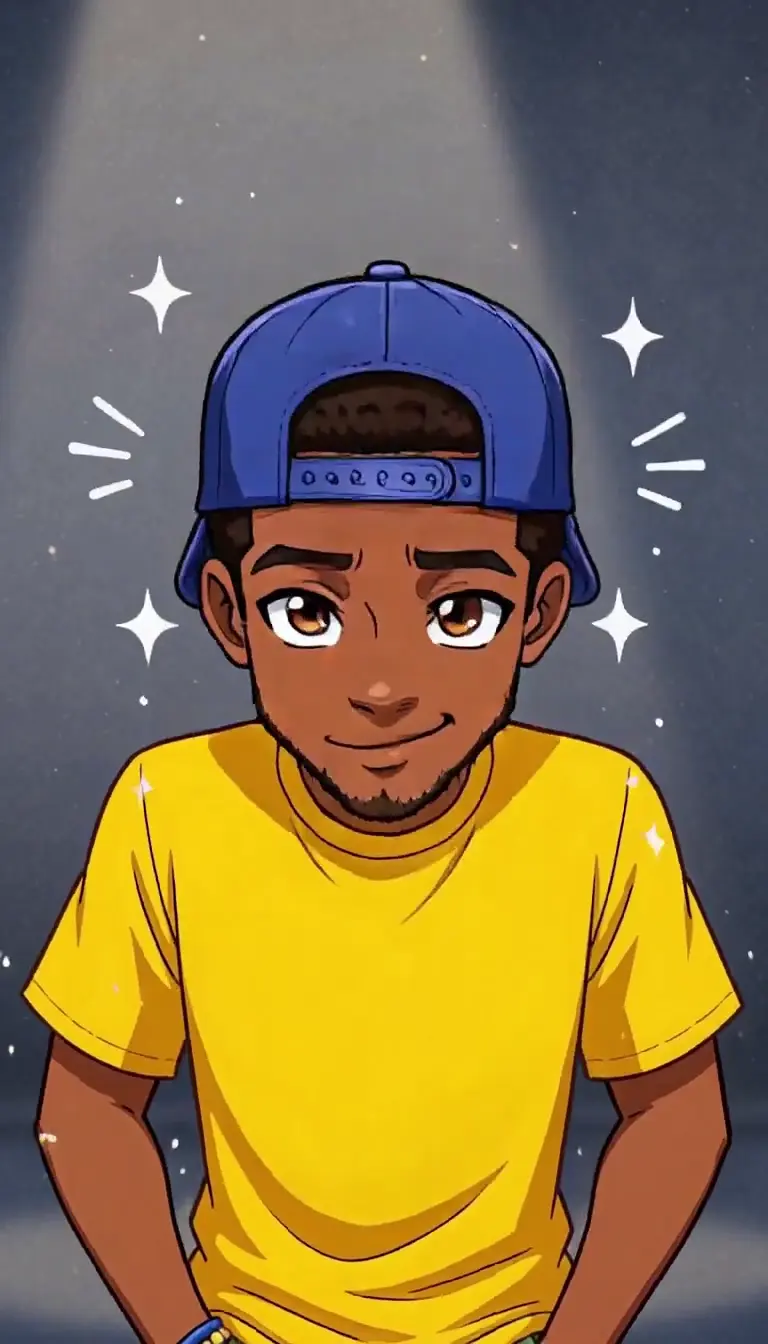
Cut-out bop
A flat anime-style boy in a yellow tee and backwards cap holds still while his head nods, tilts and winks on the beat. 12 seconds, vertical.
Updated
The head bop animation maker on Memevy is for meme posters who want the TikTok headbop starring their own selfie, friends, pets or a drawn character: upload one to four pictures and get a 5-, 10- or 15-second MP4 with sound at 480p to 2K, with no watermark. The default 10-second video costs 46 credits ($0.46) and any video 23 to 2,005; new accounts get no free credits right now.
How the head bop animation maker works
The head bop animation maker works in four steps and needs no keyframes: you add the pictures, pick a routine card or write your own, choose the model and the settings, then press one button. Your pictures and the routine’s prompt go to the video model; the prompt asks it to move every head on the beat, and it makes the sound in the same pass.
- Add one to four pictures, left to right: a selfie, friends, pets or a drawn character, one subject per picture.
- Pick a routine card (Cut-out bop, Cartoon row, Curtain routine, Wig & shades poses or Photo lineup), or Custom and write your own routine; on a Seedance model you can add a picture of the place.
- Choose the model, resolution, length (5, 10 or 15 seconds) and shape (9:16, 1:1 or 16:9). The button shows the credits before you press it: 46 for the default.
- Tick the box and press Make the video. It usually takes 3–8 minutes, then download the MP4.
Head bop animation examples
These five head bop animation examples show one routine card each, with the example’s own sound: a drawn boy in a cap for Cut-out bop, three cartoon cats for Cartoon row, a man in a yellow tee for Curtain routine, a wig and sunglasses for Wig & shades poses, and four cat photos for Photo lineup. Each is the look its card’s prompt asks the model for; your video uses your own pictures, and how closely it matches varies with the model.
What does headbop edit mean?
A headbop edit is a short video in which a character’s or a person’s head nods on every beat of the music while the body stays almost still, like a cut-out head on a pivot. The edit spread across TikTok from August to October 2026 through anime and fan-art clips made in CapCut or Alight Motion, usually over slowed phonk or Brazilian funk. Head bop animation, headbop and head bobbing all name the same edit.
Three other things share the name: the head bop idle animations in the Roblox catalog, BabyTron’s song HeadBop, and the 2021 TikTok head bobbing trend. This page makes the edit, not those.
How to make a head bop animation meme from a picture
To make a head bop animation meme from a picture on Memevy, add the picture, pick the routine card that fits it and press one button: the prompt asks the video model to move the head on the beat, the model makes the sound in the same pass, and there are no keyframes to set. The manual way is to cut the head out, put its anchor point at the neck in CapCut or Alight Motion and set a pair of keyframes on every beat.
Each card sends a different prompt, so match the card to the picture you have. A card only asks for a look and a set of moves; how closely the result follows it varies with the model and the picture.
Swipe the table for more
| Card | Fits | What its prompt asks for |
|---|---|---|
| Cut-out bop | A drawing, an anime character or an OC; also a pet or a selfie | Keep the picture flat and still while the head nods, tilts and winks like a cut-out layer, the hand-keyframed look |
| Cartoon row | Two to four cartoon characters or pets, one per picture | Turn each one into a white-outlined sticker in a row; the heads nod in turn, tilt together and bop together at the end |
| Curtain routine | A full-body photo of a person (or a few people) | In front of a grey curtain: a deep lean back, a point at the lens, a shrug, then a nod on every beat |
| Wig & shades poses | A waist-up or full-body photo of a person | Add a shaggy wig and black sunglasses and jump-cut to a new deadpan pose on every beat |
| Photo lineup | Photos of pets, family or friends, one per picture | Cut each one out head and shoulders in one row while the camera slides along and each head bops |
Is there a head bop effect on CapCut?
CapCut has Headbop and Head Bop Animation templates in its template library, and most head bop tutorials build the edit by hand there with keyframes on a cut-out head. A template follows its creator’s pictures, timing and sound; the Memevy head bop animation maker starts from your own one to four pictures and a routine card, and returns a finished MP4 with sound that you can open in CapCut to add text.
Head bop animation price, free credits and watermark
A head bop animation costs 46 credits ($0.46) for the default 10-second 480p video on Seedance 2.0 Mini, and 23 to 2,005 credits ($0.23 to $20.05) across every model, length and resolution, counting a credit at its lowest price of $0.01. Credits come in one-time packs with no subscription; from a zero balance the smallest purchase that covers the default video is the Trial pack, $4.99 for 56 credits. The shape, a custom routine and a place picture cost nothing extra, and a failed video gives its credits back.
No, a head bop animation is not free on Memevy: every video needs at least 23 credits, and new accounts get no free credits right now. What is free: watching the five examples, and a download with no watermark on any pack.
Swipe the table for more
| Model and resolution | 5 seconds | 10 seconds | 15 seconds |
|---|---|---|---|
| Seedance 2.0 Mini, 480p | 23 ($0.23) | 46 ($0.46) | 69 ($0.69) |
| Seedance 2.0 Mini, 720p | 49 ($0.49) | 98 ($0.98) | 147 ($1.47) |
| Seedance 2.0 Fast, 480p | 50 ($0.50) | 100 ($1.00) | 150 ($1.50) |
| Seedance 2.0 Fast, 720p | 107 ($1.07) | 214 ($2.14) | 321 ($3.21) |
| Seedance 2.0, 480p | 83 ($0.83) | 165 ($1.65) | 248 ($2.48) |
| Seedance 2.0, 720p | 178 ($1.78) | 355 ($3.55) | 533 ($5.33) |
| Seedance 2.0, 1080p | 443 ($4.43) | 886 ($8.86) | 1,329 ($13.29) |
| Seedance 2.5, 480p | 121 ($1.21) | 241 ($2.41) | 361 ($3.61) |
| Seedance 2.5, 720p | 270 ($2.70) | 540 ($5.40) | 810 ($8.10) |
| Seedance 2.5, 1080p | 669 ($6.69) | 1,337 ($13.37) | 2,005 ($20.05) |
| MiniMax H3, 768P | 72 ($0.72) | 143 ($1.43) | 215 ($2.15) |
| MiniMax H3, 2K | 115 ($1.15) | 229 ($2.29) | 343 ($3.43) |
| Wan 3.0, 480p | 42 ($0.42) | 83 ($0.83) | 124 ($1.24) |
| Wan 3.0, 720p | 83 ($0.83) | 165 ($1.65) | 247 ($2.47) |
| Wan 3.0, 1080p | 165 ($1.65) | 329 ($3.29) | 494 ($4.94) |
Swipe the table for more
| Pack | Price | Credits | Default 10 s videos | Cheapest 5 s videos |
|---|---|---|---|---|
| Trial | $4.99 | 56 | 1 video | 2 videos |
| Starter | $9.90 | 900 | 19 videos | 39 videos |
| Creator | $24.90 | 2,400 | 52 videos | 104 videos |
| Pro | $49.90 | 4,990 | 108 videos | 216 videos |
Swipe the table for more
| Question | Answer |
|---|---|
| Free head bop animation | No: every video is paid with credits |
| Sign-up credits | None right now |
| Smallest purchase for the default video | Trial, $4.99 for 56 credits (1 video at 46 credits) |
| Models other than Seedance 2.0 Mini | Purchased credits only; free credits cannot pay for them |
| Custom routine or place picture | No extra credits |
| Watermark | None |
| Watching the examples | Free |
| Failed video | Credits come back automatically |
What the head bop animation maker can’t do
The head bop animation maker makes one short video per press from one to four pictures; it is not a keyframe editor, it cannot loop a clip past 15 seconds, and it does not export a Roblox or After Effects animation.
- Lengths are 5, 10 or 15 seconds, as an MP4 with sound; there is no longer loop and no GIF or animation file.
- Up to four pictures, one subject each. A group photo counts as one picture, so put each person or pet in their own slot.
- MiniMax H3 takes two pictures at most and no place picture; for three or four pictures pick a Seedance model or Wan 3.0.
- The sound is made by the model in the same pass: the prompt asks for a slowed phonk beat with no vocals, and what you get varies by model. It cannot use your own song.
- The prompt asks the model to keep every face, art style, fur and outfit as in its picture; results vary with the model and the picture, and a drawing can come out redrawn.
- A failed video refunds its credits; a finished one you do not like is not refunded.
FAQ
Is there a head bop animation app?
There is no app to install: the Memevy head bop animation maker runs in a phone or desktop browser. Making a video needs a free Memevy account, because the credits belong to it; watching the examples needs no account.
Is this the Roblox head bop animation pack?
No. The Roblox head bop animations are avatar idle animations sold in the Roblox catalog. Memevy makes an MP4 video from your pictures and cannot add an animation to a Roblox avatar.
Can I write my own head bop animation prompt?
Yes, with the Custom card: describe the routine in your own words (10–600 characters, required), for example “they nod twice, spin their sunglasses, then freeze on the drop”. Memevy adds the lines that keep each picture’s look, the beat and no on-screen text. On a Seedance model you can also add a picture of the place.
Can I use my friends’ photos in a headbop meme?
Only with their permission: the tick box above the button asks you to confirm it. The video is AI-made, so say so where the platform asks, and leave out people who have not agreed. This is general information, not legal advice.
More formats on the meme video templates page, and every pack on pricing.
Got a joke? Make it move.
Open the generator