AI Ceiling Fan Transition Maker — Your Face, Four Outfits
AI ceiling fan transition videos by Memevy give a video model your selfie and four looks, prompted to swap outfits behind a passing blade in a 15-second clip with sound.
- 15 seconds
- 9:16
- Four looks
- Template’s sound
Watch the fan shot
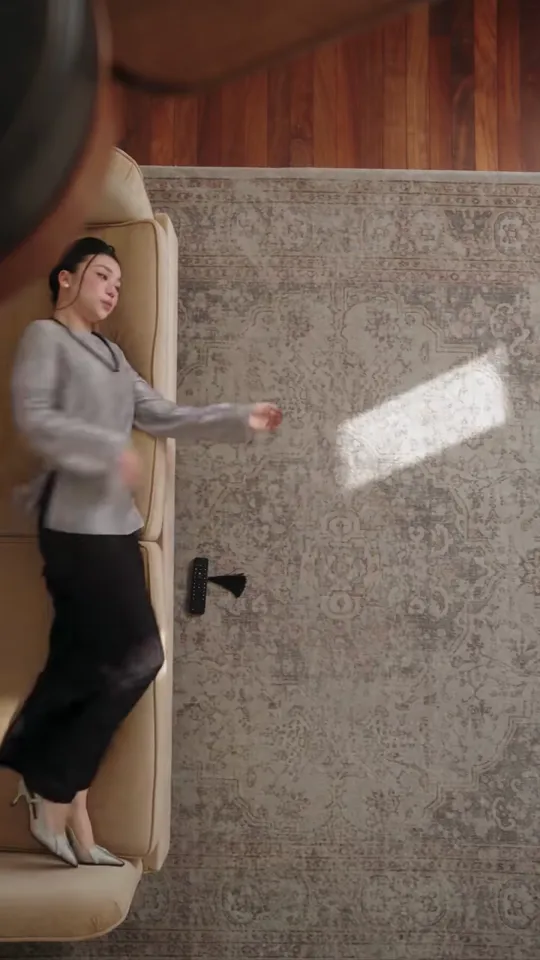
15 seconds from above a turning ceiling fan: a roll off the sofa onto the rug, then a new outfit at about 5.4, 9 and 12.9 seconds, each time behind a passing blade.
Áo dài looks
Rolls off a tan sofa onto a grey rug: a grey blouse and black trousers, then a dark red floral áo dài, a white áo dài and a blush lace áo dài. The same sound as the template. 15 seconds.
Updated
The AI ceiling fan transition maker on Memevy is for TikTok and Reels posters after the fan blade outfit change without filming it: one face photo plus four outfit photos or a look pack becomes a 15-second 9:16 MP4 at 480p to 2K, with the template’s sound and no watermark. A video costs 83 to 2,400 credits ($0.83 to $24.00); new accounts get no free credits, and the smallest pack that covers one video is Starter, $9.90.
How the AI ceiling fan transition maker works
The AI ceiling fan transition maker works in four steps and needs no prompt: you add a face photo, choose four looks, pick the model and the quality, then press one button. Your photos go to the model with a 15-second reference clip of the overhead fan shot; the prompt asks the model to put your face in it and to change the outfit only while a blade covers the body, and the template’s sound is put on the result.
- Add one face photo of the person who lies under the fan: one person, face clear and uncovered.
- Pick the four looks: My outfits takes four outfit photos (worn, flat-lay, hanger or shop shots) in the order they should appear; Everyday, Autumn, Night out, Halloween and Formal are ready-made packs; Custom lets you describe four looks in your own words.
- Choose the model and the quality. The button shows the credits before you press it: 247 for the default, Wan 3.0 480p.
- Tick the box and press Make the video. It usually takes 3–8 minutes; then download the MP4 with the sound and post it.
Swipe the table for more
| Look | When | What the template shows |
|---|---|---|
| Look 1 (outfit photo 1) | 0–5.4 s | The template rolls off the sofa onto the rug in the first second and settles into a pose |
| Look 2 (outfit photo 2) | 5.4–9 s | A blade covers the body; the prompt asks for the second outfit once it passes, in a new relaxed pose |
| Look 3 (outfit photo 3) | 9–12.9 s | The prompt asks for the third outfit behind the next full blade pass |
| Look 4 (outfit photo 4) | 12.9–15 s | The prompt asks for the last outfit, held to the end of the clip |
Swipe the table for more
| Looks | What you upload | The four outfits |
|---|---|---|
| My outfits | Face photo + exactly four outfit photos | Clothes you own or want to show, in your order |
| Everyday | Face photo only | Jeans, white T-shirt, sneakers · Camel trench coat, black turtleneck · Grey hoodie, cargo trousers · Cream cable-knit, navy trousers |
| Autumn | Face photo only | Cream chunky knit, corduroy trousers · Brown leather jacket, dark jeans · Beige trench, red tartan scarf · All-black velvet evening look |
| Night out | Face photo only | Black leather jacket, black jeans · Silver sequinned top · Deep red satin, gold jewellery · White tailored suit |
| Halloween | Face photo only | Witch: pointed hat, long robe · Vampire: red-lined cape · Skeleton bodysuit · Pumpkin costume |
| Formal | Face photo only | Black tie in black and white · All-white formal look · Emerald satin · Champagne sequins |
| Custom | Face photo + a short description | The four looks you write, in your order |
Ceiling fan transition examples on the same shot
The three ceiling fan transition examples below are 15-second videos on the same overhead shot your video is generated against: a roll off the sofa onto the rug in the first second, then four outfits, each swapped while a blade passes. The sofa, rug and fan differ a little from one to the next. The first has the same sound that is laid under your video; the other two use other songs.
What is the fan blade outfit change in the AI ceiling fan transition?
The fan blade outfit change is the move the whole AI ceiling fan transition is built on: the camera looks straight down from above a turning ceiling fan at someone lying on a rug, and each time a blade sweeps across the lens their outfit is different. The blade works as the wipe, so the person, the room and the camera never move while the clothes change. The trend is also called the fan transition, the ceiling fan outfit change or under the fan.
The Tab reported on 28 September 2026 that the AI ceiling fan trend had gone viral across TikTok that week. People also make it without AI, filming one take per outfit with a phone fixed to the ceiling and editing the takes together. Posts use different songs; there is no single official sound.
Do you need a fan transition prompt to make it?
No, a fan transition prompt is not needed on Memevy: the template already carries it. The prompt sent to the model describes the overhead shot, the three-blade fan, the roll onto the rug and the second each look appears, and asks the model to change only the clothes, only while a blade covers the body. You add a face photo and choose the looks; the only thing you ever type is the Custom description of your four looks.
A written prompt alone leaves the model to invent the blade timing, the fan and the camera. That is why each video here is generated against the same 15-second reference clip of the shot, which the model gets with your photos; how closely the result follows it varies with the model.
AI ceiling fan transition pricing and credits
An AI ceiling fan transition video costs 83 credits ($0.83) on Seedance 2.0 Mini 480p, 247 credits ($2.47) on the default Wan 3.0 480p, and up to 2,400 credits ($24.00) on Seedance 2.5 at 1080p, counting a credit at its lowest price of $0.01. Credits come in one-time packs with no subscription and last 12 months; the smallest pack that covers a video is Starter, $9.90 for 900 credits. Own outfits, a look pack or Custom cost the same, and a failed video gives its credits back.
No, an AI ceiling fan transition video is not free on Memevy: every video needs at least 83 credits, and new accounts get no free credits, and the smallest pack that covers one video is Starter, $9.90. What is free: watching the examples, and a download with no watermark on any pack. The $4.99 trial pack (56 credits) is too small for one on its own.
Swipe the table for more
| Model and quality | Note | Credits | At $0.01 a credit |
|---|---|---|---|
| Wan 3.0, 480p | The default | 247 | $2.47 |
| Wan 3.0, 720p | 494 | $4.94 | |
| Wan 3.0, 1080p | 987 | $9.87 | |
| Seedance 2.0 Mini, 480p | The cheapest | 83 | $0.83 |
| Seedance 2.0 Mini, 720p | 179 | $1.79 | |
| Seedance 2.0 Fast, 480p | 178 | $1.78 | |
| Seedance 2.0 Fast, 720p | 385 | $3.85 | |
| Seedance 2.0 Pro, 480p | 300 | $3.00 | |
| Seedance 2.0 Pro, 720p | 644 | $6.44 | |
| Seedance 2.0 Pro, 1080p | 1,618 | $16.18 | |
| MiniMax H3, 768P | Sold as 768P or 2K | 429 | $4.29 |
| MiniMax H3, 2K | Sold as 768P or 2K | 686 | $6.86 |
| Seedance 2.5, 480p | Photos pass a quick safety check first | 432 | $4.32 |
| Seedance 2.5, 720p | Photos pass a quick safety check first | 972 | $9.72 |
| Seedance 2.5, 1080p | Photos pass a quick safety check first | 2,400 | $24.00 |
Swipe the table for more
| Pack | Price | Credits | Seedance 2.0 Mini 480p | Wan 3.0 480p (default) |
|---|---|---|---|---|
| Trial | $4.99 | 56 | Not enough for one | Not enough for one |
| Starter | $9.90 | 900 | 10 videos | 3 videos |
| Creator | $24.90 | 2,400 | 28 videos | 9 videos |
| Pro | $49.90 | 4,990 | 60 videos | 20 videos |
Swipe the table for more
| Question | Answer |
|---|---|
| Free ceiling fan transition video | No: every video is paid with credits |
| Sign-up credits | None right now |
| Trial pack | $4.99, 56 credits: too small for one video on its own |
| Smallest pack for one video | Starter, $9.90 for 900 credits (10 videos on Seedance 2.0 Mini 480p) |
| Own outfit photos, a look pack or Custom | Same price |
| Watermark | None |
| Watching the examples | Free |
| Failed video | Credits come back automatically |
What the AI ceiling fan transition maker can’t do
The AI ceiling fan transition maker makes one thing: the 15-second vertical overhead fan shot with four looks and the template’s sound, starring one person from one face photo. It does not film a room you choose, put two people under the fan, change the timing of the blade passes or let you pick the music.
- One template: 15 seconds, vertical 9:16, one locked overhead shot with four looks at fixed moments. No shorter or longer version, no other room and no other sound.
- One person per video. Two friends or a couple under the same fan is not something this template makes.
- Exactly four outfit photos with My outfits: no repeats, and the face photo cannot double as an outfit.
- The prompt asks the model to keep the face from your photo and the garments from your outfit photos; how close it looks varies with the model and the photos.
- Seedance 2.0 Mini and Fast make 480p or 720p; Wan 3.0, Seedance 2.0 Pro and Seedance 2.5 go up to 1080p; MiniMax H3 makes 768P or 2K.
- A failed video refunds its credits; a finished one you do not like is not refunded.
FAQ
Does the AI ceiling fan transition video have sound?
Yes, the AI ceiling fan transition video has sound: the model makes the picture silent, then the template’s own soundtrack is laid under it, so the finished MP4 plays with sound; there is no silent version and no song to pick. Making the video does not give you a music licence, so each platform’s sound rules still apply, and you can swap in a sound from the app when you post.
How do I download the ceiling fan outfit transition video?
When the video is ready, press Download MP4 under it to save the file (15 seconds, 9:16, with sound) to your phone or computer. It also stays in your Memevy account, so you can come back and download it again later.
Do I need an app or an account?
No app: it runs in a phone or desktop browser. Making a video needs a free Memevy account, because the credits belong to it. Watching the examples needs no account.
What if the video fails or the outfits do not look like my photos?
If the model refuses the photos or the video fails, the credits come back automatically. A finished video that does not match your photos is not refunded, so start from a sharp, front-facing face photo of one person and outfit photos that show the whole garment on a plain background, and try another model if the first result drifts.
More formats on the meme video templates page, and every pack on pricing.
Got a joke? Make it move.
Open the generator