Office Parkour AI — Put Yourself in The Office Parkour Scene
Office parkour AI by Memevy casts your photo, your pet or three friends in The Office “Parkour!” cold open: couch flip, shout, counter and desk jumps.
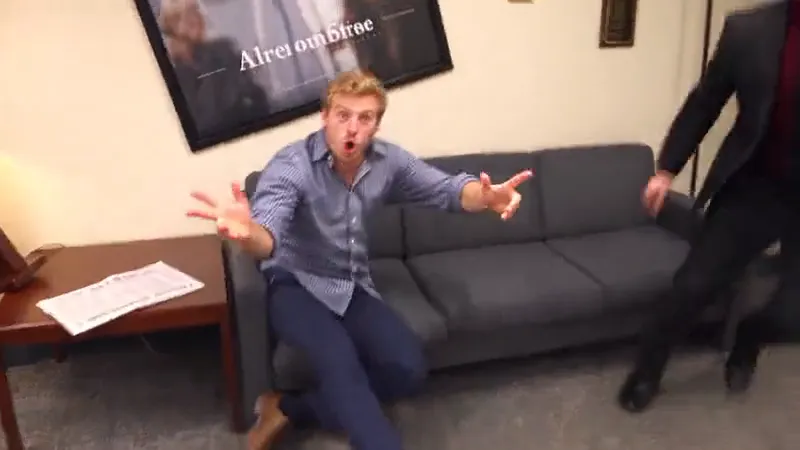
- 14 seconds
- 16:9
- “Parkour!” shouts
Watch the scene
You: your photo takes the couch flip, the “Parkour!” shout and the counter; the desk jumper stays as in the clip.
Updated
The office parkour AI video maker on Memevy is for fans who want to post the Michael Scott couch flip with their own face, a pet or a trio of coworkers. Upload one or three photos and get a 14-second 16:9 MP4 with the scene’s “Parkour!” shouts and no watermark, at 480p to 1080p. A video costs 400 to 2,240 credits ($4.00 to $22.40); the smallest pack that covers one is Starter, $9.90 for 900 credits.
How the office parkour AI video maker works
The office parkour AI video maker works in four steps and needs no prompt: you pick You, Trio or Pet, add one or three photos, choose the model and the quality, then press one button. Your photos go to the model with a 14-second AI re-cast of the parkour scene, the prompt asks the model to put your faces and clothes on its jumpers with the same flips, cuts and camera, and the clip’s “Parkour!” shouts are put back on the result.
- Pick who plays it: You (one photo of you), Trio (three photos of three different people) or Pet (one photo of a dog or cat).
- Add the photos. Photo 1 is always the one who flips onto the couch and shouts “Parkour!”; in Trio, Photo 2 films with the camcorder and jumps the desks, and Photo 3 climbs over the reception counter.
- Choose the model and the resolution. The button shows the credits before you press it: 404 for the default, Seedance 2.5 480p.
- Tick the box and press Make the video. A 14-second video takes several minutes on the model; the bar shows progress, and the video stays in your account if you leave. Then download the MP4 with the shouts and post it.
Swipe the table for more
| When | Shot | Who |
|---|---|---|
| 0–4 s | The waiting area: a run, a dive over the couch armrest, an upside-down landing, and at about 3.2 s the shout “Parkour!” into the camera | Photo 1 (You, Trio or Pet) |
| 4–7 s | The reception counter: one stands on top and jumps off, one climbs over it seen from behind, one films from a side table | Photo 1 on the counter; in Trio, Photo 3 climbs and Photo 2 films |
| 7–10.4 s | The open office: a leap from desk to desk over the monitors, then a whip pan to a wide view | Trio: Photo 2. You and Pet: the clip’s jumper |
| 10.4–14 s | The kitchen: a crouch, a run down the corridor and a push off the white fridge | Trio: Photo 2. You and Pet: the clip’s jumper |
Swipe the table for more
| Part | What it covers |
|---|---|
| Included (14 s) | The couch flip and the first “Parkour!”, the reception counter, the desk jumps and the push off the fridge, with the shouts of those shots |
| Not included | The hallway run with more shouts and the leapfrog at the double doors that close the full cold open |
| Frame | 16:9 widescreen only, like the TV scene; crop it in an editor for a 9:16 post |
Swipe the table for more
| Cast | What to upload |
|---|---|
| You | One photo, face to the camera, sharp, waist up or full body. You take the couch flip, the shout and the counter; the clip’s other two jumpers stay as new AI faces |
| Trio | Three photos of three different people, one person each. Photo 1 flips and shouts, Photo 2 films and jumps the desks, Photo 3 climbs the counter |
| Pet | One photo of one animal, whole body, eyes open. The prompt asks the model to keep it a four-legged animal on the couch and the counter; results vary |
Office parkour AI video example
The office parkour AI example below is the template clip itself: the 14-second AI re-cast of the scene with new faces that every video follows, with its own shouts. A man in a checked shirt flips onto the couch and shouts, the crew climbs and films at the counter, one jumps the desks and pushes off the fridge; in your video the prompt asks the model to put your photos in those places.
What is the office parkour meme?
The office parkour meme is the “Parkour!” cold open of the US sitcom The Office: Michael Scott runs at a couch, flips over the armrest, lands upside down and shouts “Parkour!” at the camera, then Dwight and Andy chase him over the reception counter, the desks and the kitchen fridge. The clip has lived for years as a reaction GIF and a TikTok sound, and in late 2026 it turned into an AI trend where people put their own face, their friends or their pet into the scene.
If you only remember the picture, look for a man in a checked shirt diving over a grey office couch, a coworker filming with a small camcorder from a side table, and someone in a green sweater climbing a curved wooden counter. On this page that scene is the template: your photos decide who flips, who films and who climbs.
What episode of The Office is the parkour scene from?
The office parkour scene is the cold open of “Gossip”, season 6, episode 1 of The Office (US), which first aired on NBC on September 17, 2009 (Wikipedia). It plays before the opening titles, with Michael, Dwight and Andy doing what they call hardcore parkour around the Dunder Mifflin office.
Is the office parkour AI video the original clip?
No, the office parkour AI video is not the original clip from the show and not a face swap of it. The model makes new footage from your photos, following an AI re-cast of the scene with new faces and the same couch, counter, desks, cuts and camera moves; the actors of The Office are not in it, and the sound is that clip’s own “Parkour!” shouts.
Because the video is generated, the prompt asks the model to take the face, hair and clothes from each photo and to place the flip, the shout at about 3.2 seconds, the counter and the desk jumps where the scene has them; how close each face looks varies with the model and the photo.
Can I make an office parkour AI GIF?
Yes, an office parkour AI GIF starts from the MP4 this page makes: Memevy exports MP4 only, so cut the first four seconds (the run, the couch flip and the “Parkour!” shout) in any GIF maker or phone editor and save that part as a GIF. The shout is the moment people use as a reaction meme GIF; a GIF has no sound, so the full MP4 is the version to post when you want the yell.
Office parkour AI pricing and credits
An office parkour AI video costs 400 credits ($4.00) on MiniMax H3 768P, 404 credits ($4.04) on the default Seedance 2.5 480p, and up to 2,240 credits ($22.40) on Seedance 2.5 1080p, counting a credit at its lowest price of $0.01; every video is 14 seconds. Credits come in one-time packs with no subscription; the $4.99 trial pack (56 credits) is too small for one, so Starter ($9.90, 900 credits) is the smallest purchase that covers a video. You, Trio and Pet cost the same.
No, an office parkour AI video is not free on Memevy: every video needs at least 400 credits, and new accounts get no free credits right now. What is free: watching the example, a download with no watermark on any pack, and the credits back when a video fails.
Swipe the table for more
| Model and quality | Length | Note | Credits | At $0.01 a credit |
|---|---|---|---|---|
| Seedance 2.5, 480p | 14 s | The default; photos pass a quick safety check first | 404 | $4.04 |
| Seedance 2.5, 720p | 14 s | Photos pass a quick safety check first | 908 | $9.08 |
| Seedance 2.5, 1080p | 14 s | Photos pass a quick safety check first | 2,240 | $22.40 |
| MiniMax H3, 768P | 14 s | The lowest price; one tier only (768P, about 720p) | 400 | $4.00 |
Swipe the table for more
| Pack | Price | Credits | MiniMax H3 768P | Seedance 2.5 480p (default) |
|---|---|---|---|---|
| Trial | $4.99 | 56 | Not enough for one | Not enough for one |
| Starter | $9.90 | 900 | 2 videos | 2 videos |
| Creator | $24.90 | 2,400 | 6 videos | 5 videos |
| Pro | $49.90 | 4,990 | 12 videos | 12 videos |
Swipe the table for more
| Question | Answer |
|---|---|
| Free office parkour AI video | No: every video is paid with credits |
| Sign-up credits | None right now |
| Trial pack | $4.99, 56 credits: too small for one video |
| Smallest pack for one video | Starter, $9.90 for 900 credits |
| You, Trio or Pet | Same price |
| Watermark | None |
| Watching the example | Free |
| Failed video | Credits come back automatically |
What the office parkour AI video maker can’t do
The office parkour AI video maker makes one thing: the first 14 seconds of the parkour scene as a 16:9 MP4 with the scene’s shouts, from one photo (you or a pet) or three (a trio). It does not edit the NBC footage, change the moves, the length or the sound, or make a vertical or GIF file for you.
- One scene, one length: the first 14 seconds of the cold open in 16:9. There is no 7-second couch-only cut, no 24-second full version and no vertical frame.
- It does not edit or face-swap the NBC footage, and the show’s actors are not in it: the model makes new footage that follows an AI re-cast of the scene with new faces. The sound is that clip’s own shouts.
- In You and Pet only the jumper who flips onto the couch changes; the other two jumpers stay as the clip’s AI faces. Pick Trio to cast all three.
- One person or animal per photo. A group photo is not split for you, and Trio needs three different photos.
- Seedance 2.5 makes 480p, 720p or 1080p; MiniMax H3 makes 768P only.
- The upside-down landing and the wide counter and desk shots are the hardest moments for the model: faces are small or upside down there. The prompt asks it to keep each face, hairstyle and outfit from its photo and never to swap people; how close it looks varies with the model and the photo.
- MP4 only, no GIF export. A failed video refunds its credits; a finished one you do not like is not refunded.
FAQ
Does the office parkour AI video have the “Parkour!” sound?
Yes. The model makes the picture silent, then the shouts of the clip it follows (“Parkour!” and the cheering around it, no music) are laid under it, so the MP4 plays with them from start to end. When you post to TikTok or Reels you can also mute it and pick the app’s own parkour sound.
Can my dog or cat do the office parkour?
Yes, pick Pet and add one photo of one animal, whole body and eyes open. The pet takes the couch flip, the shout at the camera (a wide-open mouth, as if barking) and the reception counter; the clip’s other jumpers stay as they are. The prompt asks the model to keep it a real four-legged animal with no clothes; results vary with the photo.
Do I need an app or CapCut to make the office parkour AI video?
No. It runs in a phone or desktop browser with no app and no CapCut template: add the photos, press the button and download the MP4. Making a video needs a free Memevy account, because the credits belong to it; watching the example needs no account.
Can I use a photo of a celebrity, my boss or a child?
Use photos of adults who agreed to be in the video, and tick the box that says so. Photos of children, well-known people or anyone who has not agreed are not allowed on Memevy, and a video meant as a joke about a coworker still needs their yes.
More formats on the meme video templates page, and every pack on pricing.
Got a joke? Make it move.
Open the generator