Bicep Heart AI — Send a Seven-Second Arm Heart
Bicep Heart AI on Memevy turns one photo into a seven-second flex-and-heart video, following a fixed motion guide with sound.
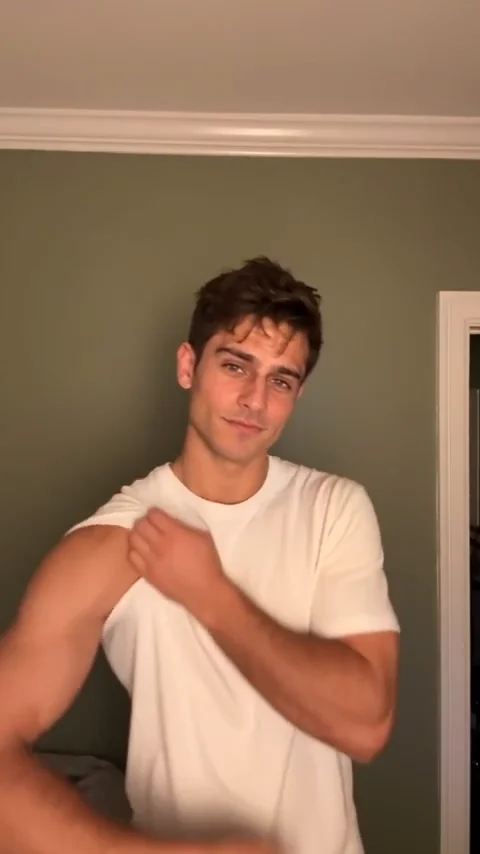
- 7 seconds
- 9:16
- Template recording included
Seven-second gesture preview
Smile, flex one arm, then curl the other hand inward. Inspect the full result before sharing.
Bicep Heart AI on Memevy uses one adult or pet photo to request a seven-second arm-heart video: a smile, one bent arm and the opposite hand curling inward. A fixed guide supplies the room, motion and recording; likeness and hand shape can vary. The vertical MP4 has no added watermark, with 480p–1080p options. Generation costs 39–1120 purchased credits ($0.39–$11.20 at Pro rates); the smallest first-time purchase is $4.99. No free generated preview is offered.
Updated
How it works
Send an arm heart by uploading one photo, choosing quality and checking the finished clip before downloading. The photo supplies the subject’s appearance; the fixed guide supplies the smile, flex, hand placement, room and timing. You do not need to film a performance or write a prompt, but the model can still change details.
- 1
Give the photo room to move
Choose one clear adult or pet. Show the face, shoulders and both arms or forelegs, with space beside the elbows. A waist-up view gives the model more to work with than a tightly cropped face.
- 2
Check the model and credit quote
Keep Mini 480p for 39 credits, or choose another model and quality. Every option requests the same seven-second, 9:16 gesture; the quote updates before you create.
- 3
Play the whole pose before sending
After generation, watch from the opening smile through the final hold. Check the face, count the limbs, follow the fingertips and listen to the recording. Download the MP4 when you are happy with it.
Watch the hand-to-arm gesture
Three seven-second clips show a single performer smiling, raising one arm and bringing the free hand against it. The fixed camera faces a green wall, and each clip includes the same recording; clothing, lighting, letterboxing and exact fingertip timing differ. Watch the small space inside the final heart rather than expecting an overhead, two-arm pose.
White T-shirt · sleeve and flex
7 s · vertical · with sound
A white-shirted performer lifts a sleeve, bends one arm and closes the small heart against a green wall.
Dark T-shirt · inward wrist
7 s · vertical · with sound
A dark-shirted performer curls the raised wrist inward as the free hand crosses the chest; this clip has black borders.
Gym top · final heart outline
7 s · vertical · with sound
Bare upper arms reveal the curved hand-to-arm outline held at the end of a dim green-room shot with black borders.
What is the bicep heart trend?
The bicep heart trend is a small heart made against one flexed upper arm. The performer faces the camera, smiles, bends one elbow outward and brings the opposite hand across the chest. The curved wrist and free fingertips complete the outline beside the bicep. This tool requests that single-person, seven-second version with the template’s recording; it is not the pose with both arms above the head.
Swipe the table for more
| Your photo supplies | The motion guide supplies |
|---|---|
| Face or pet identity, hair or fur, build and outfit | One frontal shot, green wall and doorway, smile and arm movement |
| One subject for the whole take | Seven seconds, vertical 9:16, the clip recording |
Bicep Heart AI review: what should I check?
A bicep heart AI review should follow the full movement, especially the last second. Check that the same face or pet remains visible while the arm rises, that the free hand meets the flexed arm, and that the small heart stays open until the cut. Count fingers or paws and listen to the recording before sending the MP4. A higher-priced model still needs the same checks.
- Opening: one subject, recognizable face and consistent clothing or fur.
- Movement: one elbow rises; the opposite hand crosses the chest without extra limbs.
- Ending: fingertips and arm make one small outline, held to the cut.
- Sound: the included recording plays and ends with the clip.
Pricing & credits
Generation is paid. One seven-second video starts at 39 purchased credits ($0.39 at the Pro pack rate of $0.01 per credit); the smallest eligible first-time Trial purchase is $4.99. Browsing the examples is free, but there is no free generated preview. Choose quality in the tool to see the quote before creating, then download the completed MP4 without an added watermark.
Swipe the table for more
| Model and resolution | Length and shape | Credits | Pro equivalent |
|---|---|---|---|
| Seedance 2.0 Mini · 480p | 7 s · 9:16 | 39 credits | $0.39 |
| Seedance 2.0 Mini · 720p | 7 s · 9:16 | 84 credits | $0.84 |
| Seedance 2.0 Fast · 480p | 7 s · 9:16 | 83 credits | $0.83 |
| Seedance 2.0 Fast · 720p | 7 s · 9:16 | 180 credits | $1.80 |
| Seedance 2.0 · 480p | 7 s · 9:16 | 140 credits | $1.40 |
| Seedance 2.0 · 720p | 7 s · 9:16 | 301 credits | $3.01 |
| Seedance 2.0 · 1080p | 7 s · 9:16 | 755 credits | $7.55 |
| Seedance 2.5 · 480p | 7 s · 9:16 | 202 credits | $2.02 |
| Seedance 2.5 · 720p | 7 s · 9:16 | 454 credits | $4.54 |
| Seedance 2.5 · 1080p | 7 s · 9:16 | 1120 credits | $11.20 |
| MiniMax H3 · 768P | 7 s · 9:16 | 200 credits | $2.00 |
Swipe the table for more
| Pack | Purchase price | Credits | Mini 480p clips |
|---|---|---|---|
| Trial (once per account) | $4.99 | 56 | 1 |
| Starter | $9.90 | 900 | 23 |
| Creator | $24.90 | 2400 | 61 |
| Pro | $49.90 | 4990 | 127 |
Swipe the table for more
| Question | Answer |
|---|---|
| Browse the three clips | Free, no sign-in needed |
| Generate a personal preview | Paid; there is no free generated preview |
| Sign-up credits | 0 available; this preset requires purchased credits |
| Minimum purchase | Trial: $4.99 for 56 credits (one-time purchase, Trial once per account) |
| Download | MP4 with the template recording, no added watermark |
| Refunds | Confirmed failed tasks, including finishing or storage failures, return charged credits. Completed clips with imperfect likeness are not automatically refunded. |
Dollar equivalents compare credit use; they are not individual checkout prices. See credit packs.
What the template cannot promise
The arm-heart generator cannot guarantee a matching face, anatomically correct hands or an identical final pose. The reference guides motion rather than replacing pixels frame by frame. Pet forelegs may not close a recognizable heart, and a model can refuse an input. This page has not been checked with a paid generation; inspect every finished clip and treat it as fictional AI entertainment.
- One subject, one fixed shot, seven seconds and 9:16 only; no custom scene, song or timeline editor.
- Photos are stored so the model can read them. Access links can be opened by anyone who obtains them; do not upload sensitive pictures.
- A completed result you dislike is not automatically refunded. Confirmed failed tasks, including finishing failures, return charged credits.
FAQ
Can I use my phone, and what photo files work?
A current phone, tablet or desktop browser can use this generator without installing an app. Sign in before creating. Upload one JPG, PNG or WebP up to 10 MB, with a short side of at least 300 pixels, a long side no more than 5760 pixels and an aspect ratio between 0.4 and 2.5.
Can a pet send bicep hearts?
The prompt asks the model to keep the pet’s species, muzzle, fur and markings, and use forelegs and paws for a playful pose. Pet results have not been verified on this page. A paw cannot form the same contour as a human hand, so review the anatomy before sharing.
Which model should I try if the hands or face change?
The default is Seedance 2.0 Mini at 480p, using a seven-second motion reference. If a completed result misses the pose, another option is Seedance 2.5 480p at 202 credits ($2.02 at Pro rates), 163 credits more. No model guarantees likeness or an exact heart, and a new request costs credits.
Does buying credits give me permission to publish the clip and sound?
No. Use a photo you have permission to animate and get the adult’s consent. Check rights to the recording and any likeness before commercial use; a credit purchase does not license them. Present the result as AI entertainment rather than evidence that someone performed the gesture.
Explore meme video templates or recast a clip of your own.