Truck Jump AI Video — Sit Still as a Truck Flies Over
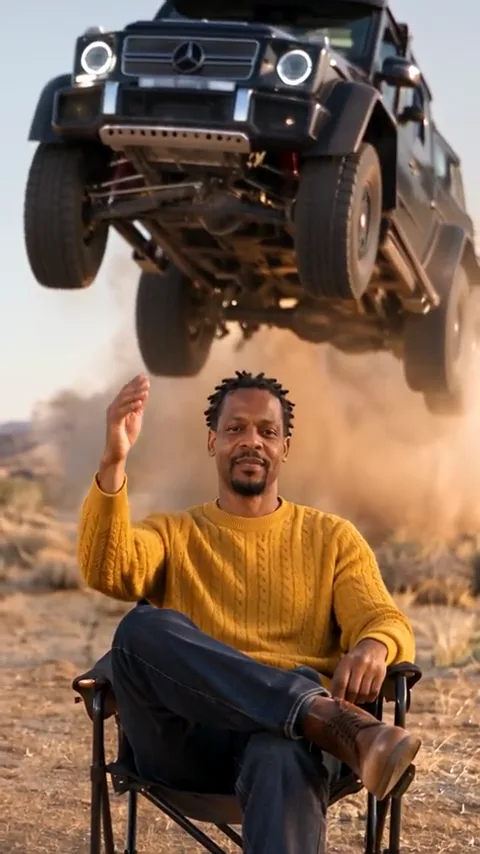
Truck jump AI video on Memevy asks a video model to seat your photo on a desert camp chair while a black off-roader jumps over your head and lands behind.
Truck jump AI video generator
- 11 seconds
- 9:16
- Template sound included
Truck jump example
An example of the jump your photo is cast into. Your face, clothes and the vehicle details will differ; watch the landing before sharing.
The truck jump AI video maker is for anyone who wants to star in the calm camp-chair trend, as themselves, a friend who agreed or a pet: one photo in, an 11-second 9:16 MP4 out with the template sound and no added watermark. Seedance 2.5 costs 324 purchased credits at 480p ($3.24 at the $0.01 Pro-pack rate), 729 at 720p and 1800 at 1080p. There are no free generations or previews. The smallest usable pack is Starter, $9.90 one-time. Likeness and vehicle details vary.
Updated
How the truck jump AI video works
The truck jump AI video needs one photo and no editing. The prompt asks the video model to take the sitter’s face, hair, clothes and build from your photo, and to follow an 11-second template clip for the fixed camera, the hand signal, the jump arc, the landing and the closer last shot; the template sound is laid back afterwards. Results vary with the photo. You only write a prompt if you want a change.
Add one photo
A clear photo of you, an adult friend who agreed, or your pet, with the face visible. A head-to-knee photo gives the model your clothes and shoes for the seated pose.
Keep the desert jump or ask for a change
Leave “Desert jump” selected for the black six-wheel off-roader, or pick Custom and describe one change, such as your own car or a coffee cup in your hand, with an optional photo of that car or outfit.
Generate and watch the landing
Sign in, confirm permission and generate (324 credits at 480p). Check your face in the wide shot and the closer last shot, and the truck’s wheels as it lands, before you download the MP4.
Swipe the table for more
| Time | What happens | What your photo decides |
|---|---|---|
| 0–2 s · wide, static | You sit on a black camp chair, legs crossed, looking at the camera; empty desert slope behind. | Face, hair, outfit and build |
| 2–3.7 s · the signal | You lift one hand casually above the shoulder (a pet lifts a paw). | Hands and sleeves |
| 3.7–8.7 s · the jump | A black off-road truck flies over the crest and right over your head in a spray of dust; you stay still and never look back. | Your calm expression while the truck passes |
| 8.7–10.4 s · the landing | The truck lands behind the chair in a dust cloud and stops right behind you. | Nothing new; the pose holds |
| 10.4–11 s · closer shot | A medium shot of you, faint smile, the parked truck filling the background. | The clearest look at the face |
Desert car jump video examples
Four takes of the same calm camp-chair jump, each with a different sitter and vehicle: a black six-wheel off-roader, an olive green 4x4, a red sports SUV and a black 4x4. They share the fixed front camera, the raised hand, the jump over the head and the landing behind the chair, but each runs 11 or 12 seconds with its own soundtrack, not the template sound your video gets. Your result starts from your own photo, so it will look different too.
Black six-wheel off-roader over a camp chair in the desert
11 s · vertical 9:16 · own soundtrack
A man in a mustard sweater sits on a black camp chair in a rocky desert, lifts one hand, and a black six-wheel off-roader flies over his head, lands in a dust cloud and stops right behind him. He never turns around. 11 seconds, its own soundtrack.
Olive green 4x4 jumps over a woman in a leather jacket
12 s · vertical 9:16 · own soundtrack
Desert scrub at golden hour: a woman in sunglasses and a leather jacket sits cross-legged, raises a hand, and an olive green 4x4 sails over her and rolls up behind the chair. 12 seconds, its own soundtrack.
Red sports SUV version: a different car, same calm jump
12 s · vertical 9:16 · own soundtrack
The same desert jump with a red sports SUV in place of the truck, over a woman in a red suit who stays seated and calm as it lands behind her. 12 seconds, its own soundtrack.
Black 4x4 over a man in a dark jacket, desert hills
12 s · vertical 9:16 · own soundtrack
A man in a dark jacket and jeans sits on a camp chair in desert scrub, lifts one hand, and a black 4x4 flies over his head, lands in the dust and pulls up behind him. 12 seconds, its own soundtrack.
Car jump AI video or desert truck jump: is it the same trend?
Car jump AI video, desert truck jump and truck jump AI video are three names for one trend: a person sits perfectly still on a camp chair while an off-road truck launches over their head and lands behind them in a cloud of dust. The best-known take uses a black six-wheel off-roader in the desert; later versions swap in the poster’s own car or a pet in the chair.
The joke is the contrast: a stunt that should make anyone duck, and a sitter who does not even blink. Copies spread on Instagram Reels and TikTok in late 2026. It has nothing to do with “Jump AI”, a meeting-notes product, or with videos on how to jump-start a car battery, which share the search words.
Truck jump AI video prompt you can read and reuse
The truck jump AI video prompt behind this generator is written for you, so you do not need to copy one: pick “Desert jump” and the server builds the full prompt around your photo. If you want to try the idea in another generator, the short prompt below, free to reuse, describes the same shot. Prompts alone rarely nail the timing; this tool also gives the model a template clip for the camera and the jump.
Vertical 9:16, 11 seconds, photorealistic, golden-hour desert. The person from my photo sits relaxed on a black folding camp chair, legs crossed, facing a static camera. They lift one hand casually. A black six-wheel off-road pickup bursts over the slope behind them, flies high over their head with dust spraying, lands hard behind the chair and stops. The person never flinches or looks back. Last shot: closer, calm faint smile, truck parked behind. Keep the face from my photo in every frame.
To change one thing here (your own car, an outfit, a coffee cup), choose Custom in the generator and write that change; the prompt keeps asking for your face, the calm pose and the jump.
Is the truck jump AI video free, and can you download it?
No, the truck jump AI video is not free on Memevy: every generation uses 324 purchased credits or more, and there is no free generated preview. Watching the examples is free. When the video is done you can download it as an 11-second vertical MP4 with the template sound and no added watermark, ready to post to Reels, TikTok or Shorts.
Swipe the table for more
| Model | Resolution | Credits | At $0.01 a credit |
|---|---|---|---|
| Seedance 2.5 | 480p | 324 | $3.24 |
| Seedance 2.5 | 720p | 729 | $7.29 |
| Seedance 2.5 | 1080p | 1,800 | $18.00 |
Swipe the table for more
| Item | What you get |
|---|---|
| Watch the examples | Free, no account needed. |
| Generated preview | None; every generation is paid. |
| Sign-up credits | None are offered right now; Seedance 2.5 needs purchased credits. |
| Smallest pack from zero | Starter: $9.90 for 900 credits, one-time. The 56-credit Trial is too small for one video. |
| Download | 11-second vertical MP4, no added watermark. |
| Sound | The template sound is laid back after generation. |
| Failed requests | Credits return automatically if a request fails or cannot be finished. |
Price per video in credits and dollars
One 11-second video costs 324 purchased credits ($3.24) at 480p, 729 ($7.29) at 720p and 1,800 ($18.00) at 1080p, at the $0.01 Pro-pack rate. Prices count the 11.5-second template clip the model reads as well as the 11 seconds it makes. From zero, the smallest pack that covers one is Starter: $9.90 for 900 credits, with no subscription.
What the generator cannot promise, and how to fix it
The generator asks a video model to repaint the sitter and the setting over a real-person template clip, so it cannot promise an exact likeness or a frame-perfect stunt. Faces can drift, features of the template sitter can remain, and a fast-moving truck can warp in the dust. A clearer photo is the first thing to try; the table lists what else to try.
Swipe the table for more
| Problem | What to try |
|---|---|
| The face drifts or looks like someone else | Use a sharp, front-facing photo without sunglasses, a mask, heavy filters or a hand over the face. Features of the template sitter can leak through; a new request costs credits again. |
| A white outfit or a baseball cap appears | The prompt rules them out unless your photo shows them. If they still appear, try a photo with the forehead and clothes clearly visible. |
| The truck changes shape, floats or loses a wheel | The prompt asks for one believable arc and a fixed number of wheels, but fast motion and dust can still warp the vehicle between frames. |
| Your own car comes out as a different model or colour | A clear side or three-quarter photo of the car in Custom gives the model more to work from; badges, wheels and paint can still come out differently. |
| You turn around or duck | The prompt asks the sitter to stay still and never look back; if a take breaks the pose, a front-facing photo where you sit or stand calmly helps. |
| Two people in the chair, a longer video, or a different camera angle | Not offered. The template has one sitter, one fixed camera and runs 11 seconds. |
Use only photos you have permission to use, and do not present the result as real footage. For general fixes that apply to any AI meme clip, see how to fix an AI meme video, or start from the meme video guide.
FAQ
Can I make it on my phone without an app?
Yes. The generator runs in a current iPhone or Android browser: choose the photo from your camera roll, sign in and generate. Nothing to install, and the result downloads as a vertical MP4 sized for Reels, TikTok and Shorts.
Can I use my own truck or car instead of the black off-roader?
Yes, as a request. Pick Custom, describe the vehicle (for example “my white Ford F-150”) and add a photo of it in the optional slot. The prompt asks the model to use that vehicle for the jump; the exact model, colour and badges can still differ.
Is the sound in the file, and can I post it?
Yes, the template sound is laid back onto the finished MP4. You are responsible for posting it: get the person’s consent, label it as an AI video, and check music and brand rights before any commercial or sponsored use; buying credits does not license them.
Do I get credits back if the jump looks wrong?
Credits come back automatically when a request fails or cannot be finished, including when the template sound cannot be added. A completed video whose face, truck or landing you dislike is not refunded automatically, so check the photo tips above before you spend credits.
Got a joke? Make it move.
Open the generator