Thar AI Video — The Lavender Studio Edit
Thar AI Video, as shown in this Memevy guide, is a dance Reel that carries each studio pose into a fantasy scene.
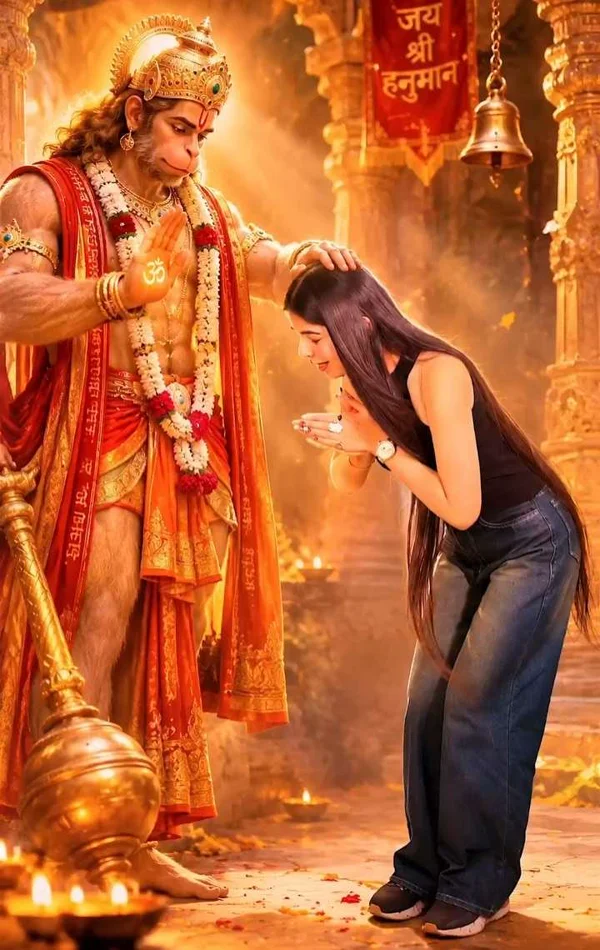
Make a Thar videoThe edit is usually called Hey Bhagwan Ek Thar De Do, Hindi for “Oh God, give me a Thar.” Watch for a bow in the studio that lands in front of Hanuman, then a pose on the bonnet of a black Mahindra Thar. The quick cuts make it look as if the dancer steps straight into each wish.
Updated
What is the Thar AI Video trend?
The lavender studio version jumps between one dancer and six fantasy scenes. Each cut starts with the pose the dancer just struck in the studio, so the setting changes in a single frame while the gesture carries over. The similarly named Krishna Wish Dream edit centers on a prayer and a Thar-to-Mercedes transformation.
- Hanuman temple
- A namaste bow carries into a blessing.
- Black Mahindra Thar
- Open arms carry over to a pose on the bonnet.
- White limousine
- A sideways lean lands against the car.
- Gym
- A biceps flex carries into the gym shot.
- Golden palace
- The same open pose lands amid falling banknotes.
- Shiva temple
- A final bow carries into the closing blessing.
How do you make a Thar AI Video from a photo?
To make a Thar AI Video, pair one portrait with a motion clip. The portrait sets who appears and the motion clip sets how they move. The preset below already supplies the lavender studio clip, including the order of the dream scenes. Add one clear photo and choose a resolution to generate a 10-second, 9:16 MP4 in the browser.
- Choose a clear portrait. Use one photo of yourself or another adult who has given you permission. The photo supplies the face and look for each shot.
- Use the lavender studio reference. The tool below already has the movement reference. Choose the resolution for the 10-second vertical clip, then confirm permission and generate.
- Check the cuts and download. Watch how each pose carries over and check the face across the quick scene changes. Download the MP4 once you are happy with it.
Thar AI Video prompt
A Thar AI Video prompt tells the model which input sets appearance and which sets movement. Give it both inputs if you are setting up your own edit. The motion clip carries the exact dance and timing, while the written scene order tells the model what to preserve as the setting changes.
Make a 10-second vertical video. Use my portrait for the dancer and my motion clip for the poses, camera and hard cuts. Return to a lavender studio between wishes. Match the dancer’s last pose to the opening frame of each dream: a blessing from Hanuman, a black Mahindra Thar, a white limousine, a gym flex, a golden palace with banknotes, then a bow before Shiva. Keep the dancer recognizable and the framing steady.
Thar AI Video generator
Add one portrait to make the lavender studio version. The generator pairs your photo with the pose and scene reference and asks the model for the six dream cuts in order. The default 480p video uses 308 credits, and the finished vertical MP4 has no Memevy watermark.
- 10 seconds
- 9:16
- AI-generated music
The Thar wish sequence
The pose carries across each cut. Your result may vary in likeness, pose and timing.
Is the Thar AI Video generator free?
A 10-second Thar AI video needs purchased credits. The 480p option costs 308 credits ($3.08 at the lowest credit rate). If you have no credits, Starter $9.90 is the smallest credit pack that covers it. The guide and still preview are free to view, and downloads have no Memevy watermark.
| Resolution | Credits | Equivalent | Smallest pack |
|---|---|---|---|
| 480p | 308 | $3.08 | Starter $9.90 |
| 720p | 692 | $6.92 | Starter $9.90 |
| 1080p | 1,709 | $17.09 | Creator $24.90 |
What can change in the finished video?
Fast cuts can shift the face, hands or pose. Features from the dancer in the motion clip can still show through. Vehicle details and temple scenes can also vary. Check those shots before posting, especially the switch from the studio to the car and the two blessing scenes.
Where the Hey Bhagwan edit was documented
A November 2026 Reel shows the studio-and-wish edit and lists “Hey Bhagwan (feat. Yash Thukral)” by Duryodhan Rana, Khanna and Soundscape as its audio. A November 20 guide documents the six dream scenes and shows how to match the poses. The first upload remains unconfirmed. Instagram Reel · November 20 editing guide
Thar AI Video FAQ
Can I make a Thar AI video on my phone?
Yes. Open this page in your mobile browser and choose a portrait from your camera roll. You can download the finished MP4 from the same browser.
What kind of photo works best for the Thar prompt?
Use one sharp, front-facing photo with even light and no other faces. Leave the eyes and hairline uncovered. A waist-up photo gives the model more of your outfit to work with.
Does the finished video have the Reel’s original audio?
The template asks the model for new instrumental sound timed to the cuts. Find the Reel’s audio separately in your social app and follow that app’s rules for using it.