fountain scene — cast two photos
fountain scene by Memevy asks a model to cast two photos in a 15-second park clip; results vary.
Create a fountain scene video
- 15 seconds
- 4:3
- Reference clip sound included
Fountain Scene · scene guide
The prompt follows the drinking, close approach, walk-away, neck touch and smile. Identity and timing vary with the model and photos.
Updated
Fountain scene video generation on Memevy asks a model to cast two adult photos in a 15-second, 4:3 park clip: Photo 1 starts right and Photo 2 left. The prompt requests the drinking, close approach, walk-away and neck touch; faces and timing vary. Output uses 480p–1080p with the clip soundtrack and no added watermark, costing 445–2,400 purchased credits ($4.45–$24.00). No free generated preview is offered.
How to make a fountain scene video
Upload two separate adult photos and assign them by the opening positions shown in the tool. Keep the park fountain or describe another environment, then choose the model and resolution. The length and shape stay fixed at 15 seconds and 4:3; the prompt asks the model to follow the reference actions, and the clip sound is restored after generation. Faces and motion can vary.
- 1
Assign the two photo roles
Add Photo 1 for the person on the right at the opening who bends to drink first and later appears in the close-up. Add Photo 2 for the person on the left who leans close, walks away and touches their neck. The prompt uses position and timing, not gender.
- 2
Keep or describe the setting
Keep the park fountain, or choose Custom and describe another environment in at least 8 characters. Custom changes the surroundings only; the wooden drinking fountain, two-person actions and camera timing stay in the prompt.
- 3
Check the fixed quote
Choose a Seedance 2.5 resolution. Every request is fixed at 15 seconds and 4:3; the default is Seedance 2.5 at 480p for 445 credits (Seedance 2.5 480p, 15 s).
- 4
Generate and inspect
Confirm both adults gave permission, then create the video. The result is saved to your account with the reference clip sound. Check face identity, role order, gestures and audio before downloading or sharing.
Swipe the table for more
| When | What the prompt asks for | Photos |
|---|---|---|
| Opening | Photo 1 is on the right and bends to drink first; Photo 2 is on the left and leans close by the fountain. | Both |
| Middle | Photo 1 comes into the front close-up and wipes their mouth; Photo 2 begins moving away to the left. | Both |
| Ending | Photo 2 touches their neck and smiles while the fountain scene closes; the generated camera and timing can vary. | Both |
Swipe the table for more
| Length | What it shows |
|---|---|
| 15 s | The complete fixed reference sequence from drinking through the walk-away and smile. |
Original fountain scene clip
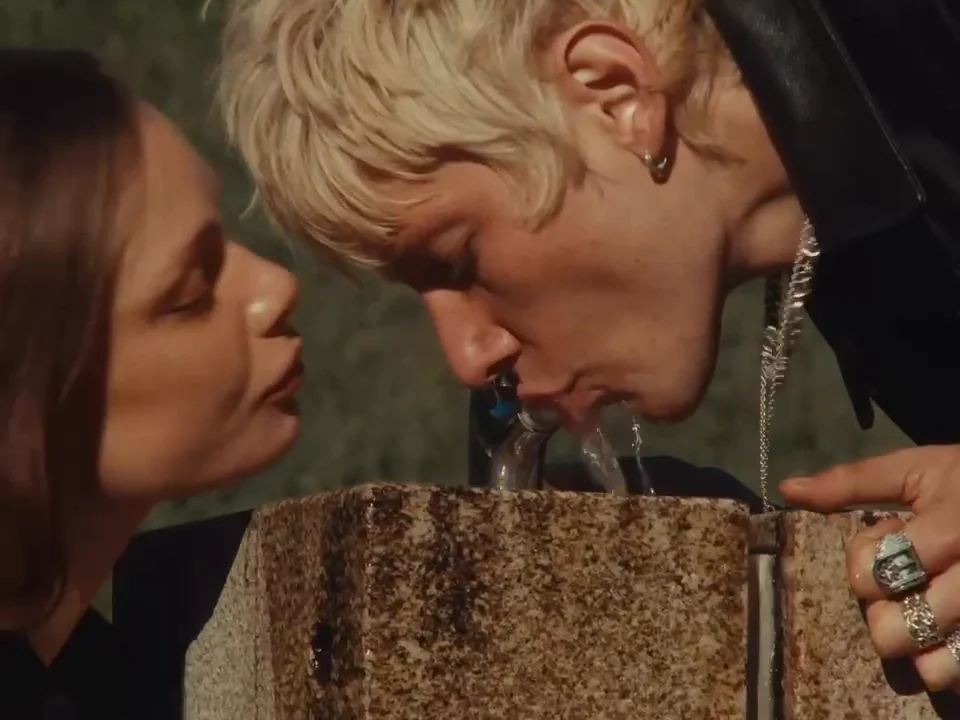
This Original fountain scene clip shows the motion reference used by the prompt: two people at a park fountain, drinking, approaching, walking away and smiling. The source has not been identified; the displayed file is 15 seconds, 4:3 and includes sound.
What is the fountain scene video?
The fountain scene video is a fixed two-person park clip. Photo 1 is on the right at the opening, bends to drink first, then appears in a front close-up and wipes their mouth. Photo 2 starts on the left, leans toward the other person, walks away to the left, touches their neck and smiles. The reference is 15 seconds, 4:3 and has sound.
The page shows one Original fountain scene clip as the prompt’s motion reference. Its original source has not been confirmed, so this tool does not attribute the scene to a film, actor or social account.
How can I make a fountain scene video?
The fountain scene maker needs two clear, separate photos, assigned by the opening role labels: Photo 1 is the right-side person who drinks first, while Photo 2 is the left-side person who walks away. Choose Park or Custom, then describe only the new environment if you choose Custom. The built-in prompt asks the model to follow the reference actions and camera rather than asking you to write a full prompt.
Select a Seedance 2.5 resolution. The output remains 15 seconds and 4:3, and the clip sound is restored after the model result. Results vary with the model, source photos and motion.
fountain scene video pricing and credits
A fountain scene video uses 445–2,400 credits ($4.45–$24.00) for one complete clip, depending on model and resolution. The default Seedance 2.5 480p quote is 445 credits ($4.45). This table reads the current template rates and can change with the site's pricing configuration.
There is no free generated preview. no free sign-up credits are available for this generator; the 56-credit Trial is below the cheapest fountain scene quote, while the Starter pack is the smallest listed purchase that covers one.
Swipe the table for more
| Model and quality | 15 s · 4:3 |
|---|---|
| Seedance 2.5, 480p | 445 ($4.45) |
| Seedance 2.5, 720p | 972 ($9.72) |
| Seedance 2.5, 1080p | 2,400 ($24.00) |
Swipe the table for more
| Pack | Price | Credits | Cheapest clip | Default clip |
|---|---|---|---|---|
| Trial | $4.99 | 56 | Not enough for one | Not enough for one |
| Starter | $9.90 | 900 | 2 videos | 2 videos |
| Creator | $24.90 | 2,400 | 5 videos | 5 videos |
| Pro | $49.90 | 4,990 | 11 videos | 11 videos |
Swipe the table for more
| Question | Answer |
|---|---|
| Browse the Original clip | Free; no account needed |
| Sign-up credits | No free sign-up allowance for this generator |
| Trial pack | $4.99, 56 credits; not enough for one clip |
| Smallest usable pack | Starter: $9.90 for 900 credits |
| Watermark | No added watermark |
| Failed request | Confirmed failures return the charged credits |
Pro values use $0.01 per credit at the largest pack rate. See all credit packs.
What the fountain scene maker cannot promise
This fountain scene maker requests a reference, not a frame-by-frame identity replacement. It cannot promise that faces, hair, clothing, hands, drinking gestures, touch timing or audio will match the source. Generated identity details can vary; inspect the completed clip before sharing and do not treat it as real footage.
- One fixed fountain scene only: 15 seconds, 4:3, two required photos and the reference clip sound. There is no timeline editor, alternate song, solo mode or different length.
- Custom describes the surrounding environment only. It does not add a third reference image or change the two photo roles, fountain action or camera sequence.
- The prompt asks for Photo 1 and Photo 2 by opening position and action. It cannot guarantee identity, face preservation, gesture order, lip movement or audio quality in every result.
- The original source has not been confirmed. This page calls the displayed file an Original fountain scene clip and does not identify a film, person or social post.
- A failed request returns its credits; a completed result that you dislike is not automatically refunded.
FAQ
What photo files and sizes does fountain scene accept?
Upload separate JPG, PNG or WebP photos, up to 10 MB each. Use one clear consenting adult per photo, with the face and clothing visible enough for the model to read. The two upload boxes define the roles; a higher-resolution source can still produce changing facial detail or motion.
Can I make a fountain scene video on my phone?
Yes. The editor works in a current phone, tablet or desktop browser and needs no app install. You can watch the Original clip and choose settings before signing in. A free Memevy account is required to create a video so the task, credits and result can be associated with you.
Can I change only one person in the fountain scene?
This preset requires two photos and asks the model to recast both visible roles. It does not provide a one-person switch or a way to keep one original performer while changing the other; use a separate photo for each role and review the completed clip before sharing.
Can I share or monetize my fountain scene video?
Get permission from both adults before uploading or publishing, and check rights for the source clip and sound. A credit purchase does not grant permission to use someone’s likeness, the original footage or its audio. Present the output as fictional AI entertainment and follow the platform where you share it.
More formats are on the meme video templates page, and every pack is on pricing.
Got a joke? Make it move.
Open the generator