Sofa Outfit Transition AI — Four Looks, One Sofa
Sofa Outfit Transition AI on Memevy uses your portrait to request four looks on an orange sofa, with an overhead camera spin and the template sound.
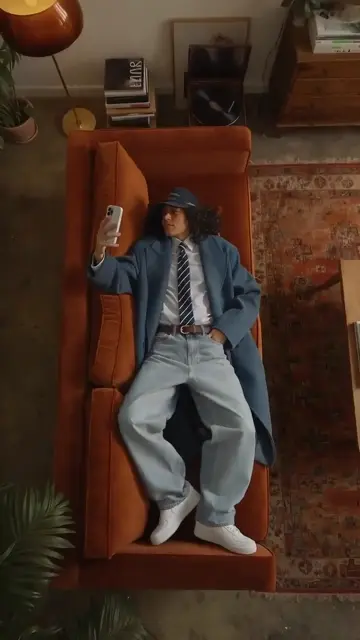
- 12 seconds
- 9:16
- Template sound included
Four looks on an orange sofa
Watch the camera moves and outfit order in the example. Results vary with your photo and the model.
Sofa Outfit Transition AI is for outfit-of-the-day creators who want a four-look fashion reel from one portrait. The prompt asks for the same face through a 12-second overhead spin on an orange sofa, with the template sound added to a vertical MP4 at 480p to 1080p and no added watermark. One video starts at 346 purchased credits ($3.46 at the Pro pack rate), with no free generation and packs from $9.90.
Updated
How the sofa outfit transition works
Your portrait gives the model a face and hairstyle to work from. A fixed template guides the camera, the orange sofa, the phone at the start and the book at the end. Pick Sample looks to follow the wardrobe shown, or write your own lineup to request four different outfits.
Upload your portrait
Choose one photo of an adult with their face clearly visible. A head-to-knee photo also gives the model some body proportions to work with.
Keep the four looks or write your own
Choose Sample looks for the wardrobe shown, or choose Custom and describe four looks in order. You can attach a clothing photo for Look 1.
Choose a resolution and generate
Sign in, confirm you have permission, and request a 12-second clip. Watch the outfit reveals before downloading the vertical MP4.
Sofa outfit transition video example
The template example shows how a turn hides each clothing change. Watch for the phone in the opening look, then the shifts in jackets and trousers while the sitter stays on the orange sofa. The camera settles overhead for a last look with an open book. The clip includes its own soundtrack.
Four outfits on the orange sofa
The camera turns overhead between four outfits. One person holds a phone in the first look and an open book in the last. 12 seconds with sound.
What is the sofa outfit change trend?
The sofa outfit change trend is a fashion reel shot around one person reclining on a couch. As the camera turns overhead, each sweep hides a cut and reveals another look. In this orange sofa version, three turns reveal four outfits in one twelve-second clip, with a phone near the start and a book at the end.
If the shot you remember shows someone rolling onto a rug and changing clothes as a fan blade crosses the frame, that is the ceiling fan outfit transition. A separate couch trend uses a jump or drop onto the cushions to cut between looks.
How do you make an AI outfit transition video from one photo?
Start with a well-lit portrait and choose Sample looks for a four-look video without writing a prompt. For a personal lookbook, choose Custom and list four outfits in the order you want them to appear. You can add one picture to guide the first outfit. The portrait remains the face reference throughout.
For example, write Look 1: cream cardigan and light jeans. Look 2: black blazer and tailored trousers. Look 3: green bomber and cargo pants. Look 4: navy knit and a denim skirt.
If you attach a photo of the cream cardigan, choose one where the shape, color and texture are easy to see.
Pricing, free access and downloads
One twelve-second video starts at 346 purchased credits at 480p ($3.46 at the Pro pack rate). From zero balance, the smallest pack for one at this resolution is $9.90 for 900 credits. Higher resolutions use more credits. The finished downloads are vertical MP4s with the template sound and no added watermark. You can watch the example before paying.
Swipe the table for more
| Model | Resolution | Credits | Value at Pro pack rate | Smallest pack from zero |
|---|---|---|---|---|
| Seedance 2.5 | 480p | 346 | $3.46 | Starter — $9.90 for 900 credits |
| Seedance 2.5 | 720p | 778 | $7.78 | Starter — $9.90 for 900 credits |
| Seedance 2.5 | 1080p | 1,920 | $19.20 | Creator — $24.90 for 2,400 credits |
Swipe the table for more
| Item | What is included |
|---|---|
| Watch the example | Free to watch without an account. |
| Generate your own clip | Sign in and use purchased credits for the full clip. There is no free generated preview. |
| Sign-up credits | None currently offered. This model needs purchased credits. |
| Trial pack | The 56-credit Trial does not cover one sofa video. |
| Download | 12-second 9:16 MP4 with sound and no added watermark. |
What this template can miss
The prompt asks for the same person through all four looks, but the face in the template can show through and the model can change hands, garment details or the timing of a reveal. For a clearer face reference, use an evenly lit photo without sunglasses or a filter. Check the clothing order and the close turns before sharing.
The template is fixed at one person, a twelve-second run time and a vertical frame. Plan a different shoot if you need multiple people, another set, or an exact view of seams, logos or prints for a product listing.
FAQ
The generator opens in a phone or desktop browser. Sign in to make a video and download it when it is ready. One clear photo with permission to edit is enough to start. If the job ends as failed, its credits return. Preview the example first so you know which camera movement and soundtrack the template follows.
Do I need an app to make the video on my phone?
You can use a current iPhone or Android browser. Choose a photo from your camera roll and sign in to generate. The vertical MP4 downloads to your phone.
Can I use a friend’s photo?
Yes, if they are an adult and have agreed to the edit and how you plan to share it. Use a photo you have permission to upload. If the video is for an ad or a client, check that you also have permission to use the recording and any visible brands.
What happens to my credits if the video fails?
The site returns credits for a job that ends as failed, including when it cannot finish preparing a valid video. A finished clip can still vary from the request. A finished clip with an outfit or likeness you dislike does not automatically qualify for a credit return.