Tiger Transition AI — Your Photo, a Hand-Cover Reveal
Tiger transition AI by Memevy uses your portrait and a video reference to request the hand-cover glow-up or tiger-makeup reveal.
Create a hand-cover reveal
- 9 seconds
- 9:16
- The clip’s own sound
Hand-cover reveal preview
The selected clip shows the hand gesture, setting and reveal used by this version. Generated likeness and timing vary.
Updated
Tiger transition AI on Memevy is for people making the “you cannot reason with a tiger” hand-cover reveal from one adult portrait. The prompt requests the selected clip’s gestures and your identity; results vary. Videos are 9–12 seconds, vertical, 480p–1080p, with original sound and no added watermark. Generation starts at 260 credits ($2.60 at Pro rates); no free generation is offered. Minimum purchase: $9.90.
How to make a tiger transition video
Start with one adult portrait and choose the version whose hand gesture and reveal you want. Memevy sends the portrait with that version’s reference clip and a prompt requesting the same person before and after the cut. Choose quality, review the price and generate. The original soundtrack is added after the model returns a video; likeness and motion depend on the photo and model.
- 1
Add one adult portrait
Photo 1 supplies the person before and after the reveal. Use a clear, front-facing photo with good light. Choose a photo you have permission to use.
- 2
Choose the reveal and quality
Glow up uses 9 seconds, Tiger makeup 11, and Short-hair tiger 12. Custom changes the 9-second after-look, with a required description and an optional styling picture. Model, resolution, length and shape stay visible.
- 3
Generate and inspect the MP4
Sign in, confirm photo permission and check the credit total. The model receives your portrait and the selected clip; its prompt requests the matching gesture and reveal. The clip’s soundtrack is added afterwards. Inspect likeness, hands and timing before sharing.
Tiger transition clips: three reveal styles
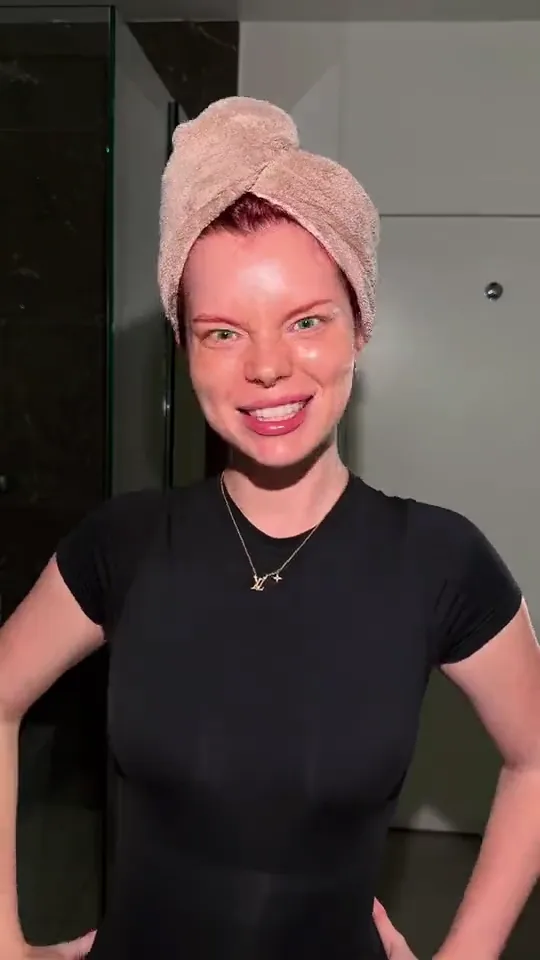
These three clips show the versions available in the generator: a towel-to-glam reveal, orange-haired tiger makeup, and short-haired tiger paint with a backdrop change. Each starts with one performer and hides the change behind a hand gesture. Choose the matching card above to request its camera and sequence. The samples show the visual format; generated faces, hands and mouth movements can differ.
Original clip · Glow up hand-cover reveal
A towel-wrapped head, a palm over the lens, then long red waves and glam makeup. 9.31 seconds, vertical, with sound.
Original clip · Tiger makeup hand-cover reveal
A claw gesture at the lens, then orange hair and black-and-white tiger face paint. 11.33 seconds, vertical, with sound.
Original clip · Short-hair tiger hand-cover reveal
An open palm hides the cut from a black backdrop to short hair and tiger face paint against an orange backdrop. 12.52 seconds, vertical, with sound.
What is the tiger transition AI template?
The tiger transition AI template is the hand-over-camera glow-up associated with “you cannot reason with a tiger”: a plain look, a palm hiding the lens, then styled hair and makeup or tiger face paint. This page requests that reveal from one portrait. It is different from an animation of a real tiger entering the scene, a still-image tiger filter, and older editing templates that require footage you filmed yourself.
How do glow-up and tiger transitions differ?
Glow up follows a towel-wrapped before-look, a hand-cover cut and a salon-style reveal in front of a grey wall. Tiger makeup follows a claw gesture, orange hair and striped face paint against a light wall. Short-hair tiger uses a black-to-orange backdrop and tiger paint with short hair. Each card uses its own reference and timing. The prompts request the uploaded person in both halves; they do not guarantee facial likeness or exact lip movements.
Can I download tiger transition templates for CapCut?
Memevy exports a finished vertical MP4, not a CapCut project or an editable tiger transition template. You do not need to film a before-clip and an after-clip to use this generator. If you already have both clips and want control over every cut, use your editor instead. The MP4 can be imported into an editor afterwards for captions or licensed music; downloading it does not include rights to the trend’s soundtrack.
Tiger transition AI pricing, free use and credits
Generation is paid: a 9-second video starts at 260 credits ($2.60 at Pro rates). The default Seedance 2.5 at 480p costs 260 credits ($2.60). From zero balance, the smallest purchase covering a video is Starter at $9.90 for 900 credits. Browsing the clips is free; there is no free generated preview. Purchased credits are required, and sign-up or check-in gifts cannot pay for these models.
Swipe the table for more
| Version | Length | Model | Resolution | Credits (USD) |
|---|---|---|---|---|
| Glow up | 9 s | Seedance 2.5 | 480p | 260 ($2.60) |
| Glow up | 9 s | Seedance 2.5 | 720p | 584 ($5.84) |
| Glow up | 9 s | Seedance 2.5 | 1080p | 1437 ($14.37) |
| Tiger makeup | 11 s | Seedance 2.5 | 480p | 317 ($3.17) |
| Tiger makeup | 11 s | Seedance 2.5 | 720p | 713 ($7.13) |
| Tiger makeup | 11 s | Seedance 2.5 | 1080p | 1756 ($17.56) |
| Short-hair tiger | 12 s | Seedance 2.5 | 480p | 346 ($3.46) |
| Short-hair tiger | 12 s | Seedance 2.5 | 720p | 778 ($7.78) |
| Short-hair tiger | 12 s | Seedance 2.5 | 1080p | 1916 ($19.16) |
Swipe the table for more
| Pack | Purchase | Credits | Default videos |
|---|---|---|---|
| Trial | $4.99 | 56 | Below the minimum for one video |
| Starter | $9.90 | 900 | 3 default videos |
| Creator | $24.90 | 2400 | 9 default videos |
| Pro | $49.90 | 4990 | 19 default videos |
Swipe the table for more
| Item | What applies |
|---|---|
| Free preview | The three sample clips are free to watch. Generated previews and exports require purchased credits. |
| Sign-up allowance | No sign-up allowance currently. |
| Watermark | No added watermark or separate export fee. |
| Sound | The selected reference clip’s soundtrack is added to the output. This is not a music licence. |
| Custom look | Same 9-second price as Glow up; optional styling photo has no extra charge. |
| Failed job | Credits return if review, generation, saving, delivery checks or sound processing fails. A finished result you dislike is not an automatic refund. |
See all packs on pricing. One-time credit packs; no subscription is needed.
What this generator cannot promise
The prompt asks for your identity, the selected hand gesture and the reference timing; no real generation has been checked for this page. A source face can remain, hands can distort, and the mouth can miss the words even when the soundtrack is correct. The service checks file structure, length, shape and resolution, but those checks do not judge likeness or whether the makeup looks convincing.
- One consenting adult portrait per video. There is no pet preset, second performer or uploaded-video editor.
- Each preset has its own fixed camera and 9-, 11- or 12-second sequence. Custom requests a different after-look using the 9-second glow-up sequence.
- The audio is the selected clip’s recording. Add captions or different licensed music in your editor after downloading.
FAQ
Can I use this in a phone browser without an app?
Yes. You can view clips and select settings in a phone or desktop browser. An account is required to generate and retrieve your video; you do not need to install a Memevy app.
Which photo should I upload?
Use one sharp, front-facing adult portrait, ideally head and shoulders, without sunglasses or a hand covering the face. JPG, PNG and WebP are accepted up to 10 MB, with dimensions from 300 to 5760 pixels and a width-to-height ratio from 0.4 to 2.5. A custom styling image is optional and supplies makeup, hairstyle and clothing only.
What should I check before sharing a video of someone else?
Get permission from the adult in the portrait and use only photos you may upload. Review the result, identify it as AI entertainment, and check the destination platform’s rules. A video purchase does not grant music or likeness rights; use audio you are permitted to use, especially for brand posts.
More formats: meme video templates.
Got a joke? Make it move.
Open the generator